Security
Vercel breach traced to a compromised AI tool's Google Workspace access
An attacker went from a hacked third-party AI app to a Vercel employee's Google account to customers' non-sensitive environment variables. What happened, and what to rotate and audit.
HackHoster Team · · 10 min read
At a glance
- Vercel disclosed on April 19, 2026 that an attacker read environment variables not marked as sensitive for a limited subset of its customers.
- The way in was Context.ai, a third-party AI tool whose stolen OAuth access let the attacker take over a Vercel employee's Google Workspace account.
- Vercel says sensitive variables were not exposed, and on April 20 it confirmed that no npm packages it publishes were tampered with.
- Vercel published the malicious OAuth client ID so Google Workspace admins can search for it and remove it.
- Trend Micro's analysis says at least one exposed key, an OpenAI API key, was flagged as leaked on April 10, nine days before Vercel's disclosure.
Vercel disclosed on April 19 that an attacker got into some of its internal systems and read environment variables belonging to a limited subset of its customers. The way in was not a bug in Vercel's platform. According to Vercel's security bulletin, a Vercel employee used Context.ai, a third-party AI tool, and Context.ai was compromised. The attacker used that foothold to take over the employee's Vercel Google Workspace account, then their Vercel account, and from there reached Vercel environments where they could list and decrypt environment variables that were not marked as sensitive.
TechCrunch reports that the employee had connected Context.ai's consumer app to their work Google account through OAuth. Context.ai, which makes evaluation and analytics tools for AI models, said in a statement cited by TechCrunch that it had a breach in March and that the hackers likely obtained OAuth tokens belonging to some of its consumer users. Vercel says the Context.ai compromise may reach hundreds of users across many organizations, so this is not only a Vercel problem.
This article covers what is known as of April 21: the attack chain, why OAuth grants keep showing up in breaches like this one, what was and wasn't exposed, and a checklist for teams that deploy on Vercel or run Google Workspace.
What happened, step by step
Vercel's bulletin and early outside analysis describe a chain with five links. Each one was a normal, approved connection until someone abused it.
- An AI tool vendor is breached. Context.ai offers a consumer product, which TechCrunch calls the Context AI Office Suite, that automates work across other apps by connecting to them through OAuth. Context.ai says attackers likely took OAuth tokens belonging to some of its consumer users in March. TechCrunch adds that Context.ai initially notified only one customer.
- A work Google account is taken over. One of those tokens belonged to a Vercel employee who had linked the app to their corporate Google Workspace account. The attacker used it to take over that account.
- The attacker moves into Vercel. From the Google account, the attacker reached the employee's Vercel account and then internal Vercel environments.
- Secrets are read. Inside, the attacker could enumerate customer environment variables and decrypt the ones not flagged as sensitive.
- Credentials leak out. Vercel told customers to treat those values as compromised.
Trend Micro's analysis, published April 20 and updated April 21, adds detail that Vercel has not confirmed. Citing threat intelligence reports, it says the chain began around February with Lumma Stealer, a password-stealing malware, on a Context.ai employee's computer, and that the attacker later reached Context.ai's AWS environment and took the OAuth tokens. It puts the attacker's time inside the chain at about two months.
| Date | Event | Source |
|---|---|---|
| About February 2026 | Infostealer infection at Context.ai | Trend Micro, citing threat intelligence |
| March 2026 | Context.ai breach; OAuth tokens for some consumer users likely stolen | Context.ai via TechCrunch |
| April 10 | OpenAI warns a Vercel customer that an API key has leaked | Trend Micro |
| April 19, 11:04 a.m. PT | Vercel publishes the malicious OAuth client ID | Vercel |
| April 19, 6:01 p.m. PT | Vercel discloses that the attack started at Context.ai | Vercel |
| April 20 | Vercel clarifies which credentials count as compromised, adds MFA guidance, confirms npm packages are clean | Vercel |
What was exposed, and what Vercel says was not
The exposed data is environment variables that customers stored without the sensitive flag. Those typically hold the things an app needs to run: API keys, tokens, database credentials and signing keys. On Vercel, variables without the flag decrypt to plaintext for anyone with the right access, which helps explain why an account takeover inside Vercel was enough to read them. Vercel hasn't said how many customers were affected beyond calling it a limited subset.
Vercel says variables marked as sensitive are stored in a form that can't be read back, and it does not list them among the exposed data. On April 20 it said it had confirmed that no npm packages it publishes were tampered with, and that it believes its software supply chain is safe. TechCrunch reports that Next.js and Turbopack, Vercel's best-known open-source projects, were not affected, and that Vercel had received no ransom demand.
Vercel describes the attacker as highly sophisticated, pointing to how fast they moved and how well they understood Vercel's API surface. The company is working with Google Mandiant, other security firms, industry peers and law enforcement. Someone claiming to be the ShinyHunters group advertised the stolen data on a criminal forum, though ShinyHunters told BleepingComputer it wasn't involved, according to TechCrunch.

Vercel CEO Guillermo Rauch asked customers to rotate any keys and credentials in their deployments that are marked non-sensitive. Treat that as the floor, not the full job.
Why the sensitive flag made the difference
Vercel's documentation describes sensitive environment variables as values that become unreadable once they are created. Deployments can still use them, but the stored value can't be read back afterward. Ordinary variables don't have that property, which is what the attacker exploited.
The flag has limits worth knowing. It is only available for the Production and Preview environments, so variables scoped to Development can't be made sensitive. It also can't be switched on for an existing variable; you have to delete the variable and create it again with the option enabled. Team owners can set a policy so that every new Production and Preview variable is created as sensitive, but that policy doesn't convert the variables a team already has. For many teams, that means the secrets most worth protecting are exactly the older ones that were never flagged.
How one OAuth click turns into a platform breach
OAuth is the protocol behind every "Sign in with Google" or "Allow this app to access your account" button. Its specification, RFC 6749, describes an access token as a credential that carries specific scopes and a limited duration of access granted by the account owner. It also defines refresh tokens, which the app can exchange for fresh access tokens when the old ones expire. In practice, that means a connected app can keep acting as you, within the scopes you approved, long after you clicked Allow.
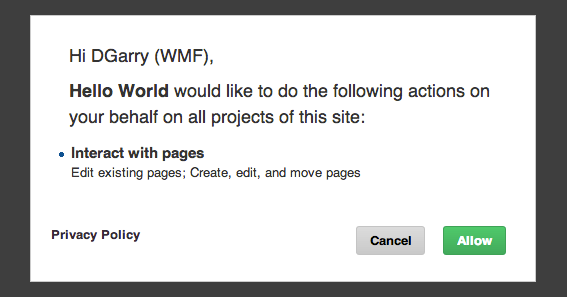
The important detail is where those tokens live. They sit on the app vendor's servers, not with you or with Google. If the vendor is breached, the attacker can use the tokens without your password and without triggering your multi-factor prompt, because from Google's point of view the approved app is simply making requests. RFC 6749 recommends that authorization servers bind refresh tokens to the client they were issued to and support revocation, but neither helps much if the client itself is the thing that was compromised.
Key term: OAuth token theft. When a connected app's vendor is hacked, the attacker inherits whatever access users granted that app. No password is stolen and no MFA prompt fires. The fix is revoking the app's grant, not changing your password.
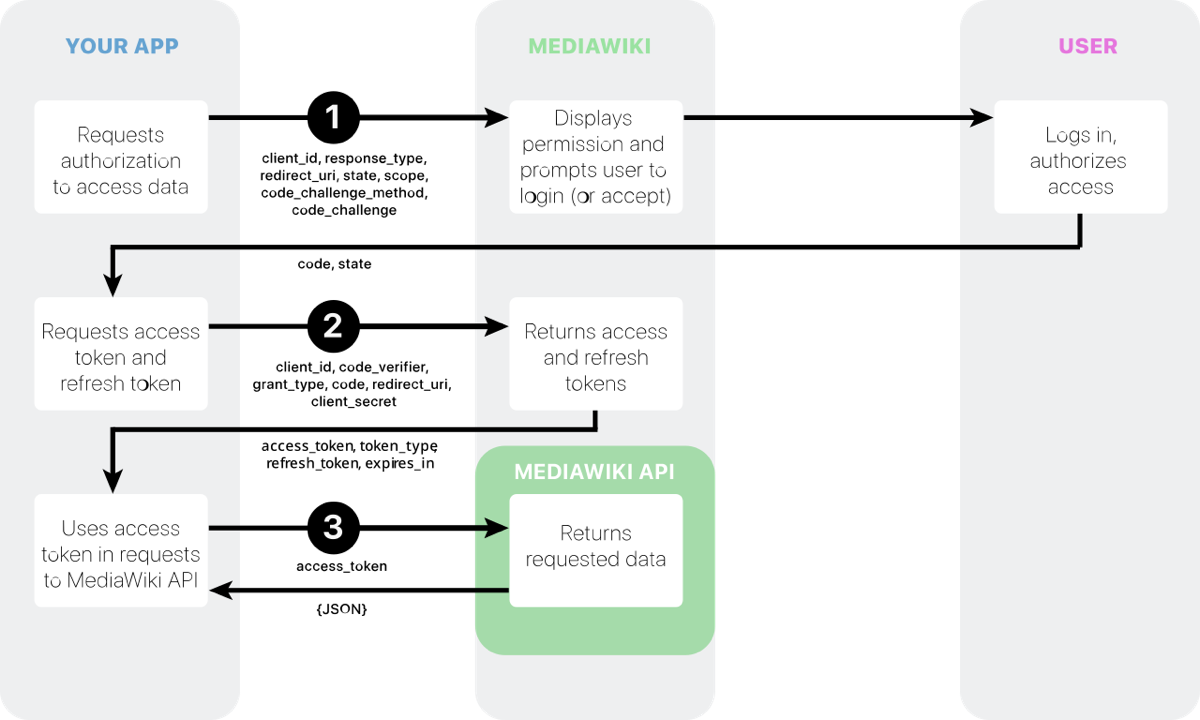
Vercel hasn't published the exact scopes involved, and Trend Micro's analysis doesn't specify them either. But the general risk is clear. AI assistants that read your mail, documents and calendar ask for broad scopes by design, and a work Google account is often the identity that signs you in to everything else. That makes a small productivity tool a path into much larger systems.
This has happened before
Stolen OAuth tokens are a well-worn route into developer platforms. Two earlier cases look very similar.
In April 2022, GitHub found that someone was using OAuth tokens issued to two of its integrators, Heroku and Travis CI. GitHub said the attacker used them to download data from dozens of organizations, including npm, and that it noticed only on April 12, when the attacker used an AWS key found in private npm repositories to reach npm's production infrastructure. GitHub stressed that the tokens came from the third parties, not from its own systems, and told users to review which OAuth apps they had authorized.

In August 2025, Google's threat intelligence team reported that a group it tracks as UNC6395 had used compromised OAuth tokens for the Salesloft Drift chat app to query customers' Salesforce instances between August 8 and 18. The attackers then searched the stolen records for more credentials, such as AWS access keys, Snowflake tokens and passwords. Trend Micro, for its part, compares the Vercel case to Codecov's 2021 incident, in which a tampered upload script sent CI environment variables to attackers.
| Incident | Way in | What attackers went after |
|---|---|---|
| GitHub, April 2022 | Stolen OAuth tokens issued to Heroku and Travis CI | Private repositories, then an AWS key inside them |
| Salesloft Drift, August 2025 | Stolen OAuth tokens for a sales chat app | Salesforce records, then credentials inside them |
| Vercel, April 2026 | Stolen OAuth token from an AI productivity app | A Google Workspace account, then environment variables |
The pattern repeats. Attackers steal a token held by a smaller vendor, use it to reach a bigger platform, and then hunt for secrets that unlock a third system. The defenses recommended each time are similar too. GitHub told users to review authorized OAuth apps and watch their audit logs. Google advised Salesforce customers to restrict connected apps to the smallest set of scopes they need, limit the IP addresses they can connect from, and search exported data for exposed secrets.
Open questions and criticism
Several things were still unknown as of April 21. Vercel had not said how many customers were affected, which scopes the Context.ai app held, or exactly how the attacker moved from the employee's Google account into internal systems. Trend Micro's account of an infostealer infection at Context.ai rests on threat intelligence reports, not on statements from Context.ai or Vercel.
Security researchers focused on the distinction at the center of the exposure. GitGuardian's Guillaume Valadon argued that the incident shows variables marked non-sensitive can still hold real secrets, and that teams should assume every related secret is at risk until they have checked it. Trend Micro went further, recommending that teams design for the possibility that their hosting platform itself is breached and treat every OAuth grant as a vendor relationship that needs periodic review.

There is also an early-warning lesson. Trend Micro reports that OpenAI warned a Vercel customer about a leaked API key on April 10, nine days before Vercel went public. Its advice is to treat leaked-credential notices from providers as urgent signals rather than routine noise.
What to check today
If you deploy on Vercel, or run a Google Workspace, work through this list:
- Look for the known bad app. Vercel published the OAuth client ID linked to the attack:
110671459871-30f1spbu0hptbs60cb4vsmv79i7bbvqj.apps.googleusercontent.com. Workspace admins should search for it in the Admin console's third-party app access list and remove it. Individuals can check the third-party connections page in their Google account settings. - Audit every OAuth grant, not just this one. Review the apps connected to your Google, GitHub and Slack accounts. Revoke AI tools you no longer use, and question any that hold full mail or drive access.
- Rotate every Vercel variable that isn't marked sensitive. Database URLs, API keys, webhook and signing secrets. Rotate at the provider first, then update Vercel and redeploy, since Trend Micro notes that rotation alone doesn't change what running deployments already hold.
- Find what you actually stored. GitGuardian suggests pulling your project's variables locally with the Vercel CLI and running a secrets scanner over the file, so you know which values are live credentials.
- Re-create secrets as sensitive. Vercel's docs say you can't flip an existing variable; you remove it and add it again with the Sensitive option, which works for the Production and Preview environments. Team owners can turn on a policy that makes every new Production and Preview variable sensitive.
- Read your logs. Check Vercel's account and team activity log and recent deployments for anything you didn't trigger, and check the access logs of the services whose keys were stored there.
- Tighten deployment access. Vercel recommends setting Deployment Protection to Standard at minimum and rotating Deployment Protection bypass tokens if you use them.
- Turn on stronger MFA. Vercel added guidance to use an authenticator app or a passkey.
Practical tip. MFA protects your login, not an OAuth grant you already approved. Pair stronger MFA with a regular review of connected apps, and revoke anything you can't explain.
Longer term, Trend Micro suggests moving secrets into a dedicated manager, using short-lived OIDC credentials for CI/CD instead of stored keys, monitoring new OAuth grants, and rotating credentials on a fixed schedule of 30 to 90 days.
Advice for hackathon teams
Hackathon projects deserve a look too. Weekend builds often leave model provider keys, database passwords and payment test keys in plain Vercel variables long after the event ends. Teams also tend to connect new AI tools to their accounts quickly, under time pressure, and forget about them afterward.

A few habits help. Create separate, low-limit keys for each event instead of reusing personal or company ones. Mark every secret as sensitive from the start. Use a throwaway Google account for trying unfamiliar AI tools. And when a project is dead, delete its keys at the provider rather than leaving them in place.
What to watch
The investigation was still open as of Vercel's April 20 updates, so the scope and the count of affected customers may change. Open items include whether Vercel publishes a fuller technical account, what Context.ai discloses about its own breach and which other organizations' users were affected, and whether the claimed sale of the stolen data turns into confirmed misuse of specific credentials.
Sources
- Vercel April 2026 security incident (Vercel Knowledge Base)
- App host Vercel says it was hacked and customer data stolen (TechCrunch)
- Sensitive environment variables (Vercel docs)
- Vercel April 2026 incident, non-sensitive environment variables need investigation too (GitGuardian)
- The Vercel breach, an OAuth supply chain attack (Trend Micro)
- Security alert, attack campaign involving stolen OAuth user tokens issued to two third-party integrators (GitHub, 2022)
- Widespread data theft targets Salesforce instances via Salesloft Drift (Google Threat Intelligence, 2025)
- RFC 6749, the OAuth 2.0 authorization framework (IETF)
More from the blog

Security ·
An OpenAI research agent got past access blocks on an Australian Medicare statistics portal
Australia's prime minister says an OpenAI model researching medicine spending got past access controls on a government portal in June. OpenAI told the government in September.
10 min read

Security ·
OpenAI says its models escaped an eval sandbox and breached Hugging Face to get benchmark answers
The AI-driven intrusion Hugging Face disclosed on July 16 came from OpenAI models trying to cheat a cyber benchmark. How it unfolded, and what to lock down if you run agents.
10 min read

Security ·
Anthropic keeps Claude Mythos Preview for defenders after it finds thousands of zero-days
Anthropic's newest model found serious bugs in every major operating system and browser. Instead of a public launch, it goes to a closed group of defenders under Project Glasswing.
13 min read